Showing posts with label Windows 10. Show all posts

Wednesday, 10 June 2015

Windows 7 and Windows 8 Features You Will Miss After Windows 10 Upgrade

windows-10-features
As the July 29 release of Windows 10 comes closer, new features and functions are making their appearance each day. But there are some features from your Windows 7 and Windows 8 PC that will no longer work when you’ll upgrade your PC to Windows 10.
In this article, we try to mention some of the worst sacrifices that you’ll be making with Windows 10.
Take a quick look at them:

There is a huge possibility that you won’t be able to choose the timings and parts of the updates you want to install in Windows 10. Microsoft wants to be in-charge of this department and you may not like it.
If you are going to upgrade your PC to Windows 10, you won’t be able to use Windows Media Center anymore. Currently Windows Media Center is available in Windows 7 Home Premium, Windows 7 Professional, Windows 7 Ultimate, and Windows 8 Pro and Windows 8.1 Pro with Media Center.
Windows 10 won’t be having Solitaire, Minesweeper and Hearts Game that are pre-installed on Windows 7.
If you use floppy drive, it won’t be supported out of the box by Windows 10. You will have to download the latest drivers using the manufacturer’s website or Windows update.
To run DVDs, you will need a third-party software in Windows 10.
If your current PC has Windows Live Essentials installed, the OneDrive version will be removes and replaced with inbox version of OneDrive.
Windows 7 desktop gadgets won’t be a part of Windows 10.

Even though some of these changes might affect you, upgrading to Windows 10 isn’t a bad choice given the fact that it is available free of cost if upgraded within one year.
To the features that won’t be continued in Windows 10, there are many free and efficient alternatives available.
For more queries, comment below.

Recommended:  NO Yearly Fee for Windows 10 Support After Upgrade Within One Year, Microsoft Clarifies


Monday, 25 May 2015

Now Get Windows 10 Updates Using Peer-to-peer Technology of Torrents

peer-to-peer-p2p-update-microsoft-windows-10
The upcoming operating system from Microsoft is witnessing numerous changes. As the launch date of the final version is approaching, newer details are surfacing about the new features coming with the upgrade. Last week we saw the advent of a new translucent Start Menu feature in Star Menu in build 10031. After the much talked about Cortana integration, Spartan browser and Continuum feature, here’s something new for you.
The Verge has reported that Microsoft will be distributing the new updates in Windows 10 using a peer-to-peer protocol i.e. P2P technology. Till now Microsoft delivers the updates from a single source and with Windows 10, company is moving ahead with P2P.
Peer-to-peer technology is a decentralized model of communication where each participant has some data sending or receiving capabilities. In the usual server-client model, the client system makes a request to the server and the server completes it. Whereas in P2P, each participant functions both as server and client. Torrenting works on the same P2P protocol with its seeds and leechers terminology.
This Peer-to-peer updating system will be optional. If you’ll choose to go with this feature, you will be able to download the updates using two modes:
Your PC will receive updates from the other systems on the same network. Or,
Your PC will be receiving the same both from the local network or the PCs on the web.
peer-to-peer-p2p-updates-microsoft-windows-10
Image: The Verge
Back in 2013, Microsoft acquired Pando Networks, which is a peer-to-peer file sharing technology just like BitTorrent. So, this movement towards P2P isn’t surprising. It’s not clear if Microsoft is using the same technology for peer-to-peer updates or something else, but it surely has some Pando Networks connection.


The P2P networking came into existence since the invention of ARPANET, but the advantages of P2P protocol became obvious to the people in late 1990s. The music sharing application Napster appeared using the P2P sharing followed by Gnutella and BitTorrent. This is also used to provide an anonymous route to the network traffic and distribute storage. Most commonly used applications of P2P networking pertain to the media sharing services.
The Verge writes that this could spark some security concerns related to the cogency of updates and it’s very possible the Microsoft has surely built some solid methods to full proof and verify the updates before installation.
With this peer-to-peer update system, Windows will be receiving updates more often. At present, every PC downloads updates for itself from the servers at Microsoft and gulps the prized bandwidth allowance which will be useful for data plans with limitations.
The software giant hasn’t yet made any official announcement, but it is expected to be included on some upcoming Windows 10 preview.

Tuesday, 12 May 2015

5 Reasons Why You should not use Microsoft’s Windows 10 Technical Preview Version

Microsoft’s Windows 10 Technical Preview may seem to be a good alternative for current Windows users, But in reality it aint so!!!

Microsoft seems to have decided not to release next major build of its Windows 10 desktop preview version next week but instead offering an update for the current Windows 10 Technical Preview 9926 version. It seems that Microsoft is running slow of it schedules or what tech world has expected of it.
Not to forget that Microsoft’s final Windows 10  build won’t be available to all users commercially, until this fall. Looking at the bleak scenario, users looking for Windows 10 final build are trying out the Windows 10 Technical Preview for free, but is it really a wise to do so?
Here are 5 top reasons why I think installing Microsoft’s Windows 10 Technical Preview is not a wise decision!
1. Windows 10 Technical Preview not the best Microsoft is going to give you in terms of software
Like all major companies, Microsoft’s Windows 10 Technical Preview has been released to test the major things it lacks. Also it is a beta version for vulnerabilities, bugs and flaws that should be fixed before the Windows 10 commercial release. What that means is, Microsoft needs as many users as possible to test Windows 10 Preview on their PC’s to help it check how it can improve the Windows 10.
More on this can be understood by reading the Windows insider program
2. Bugs , Bugs and More Bugs
Since you have chosen to test out the Windows 10 TP, you should be knowing that your PC will become more prone to bugs, vulnerabilities and crashes. Some users are even reporting BSODs.  What that means is your ‘Familiar PC’ may become very unfamiliar to you with very new and unexpected problems starting to kick in, which could be anything starting from PC getting slow to overheating, to a total performance downgrade.
3. Software Issues / Incompatibility 
One of the major reason why you should not opt for the Windows 10 TP version is that you may face various software incompatibility issue.
Think about it, you try to access a software and it goes dead with your freshly downloaded Windows 10 TP version. As said above, Windows 10 TP is a guinea pig of sorts and it may be some time before Microsoft’s engineers put all the drivers and software components for all Apps and accessories. Knowing that you are just a part of the great Microsoft Windows 10 TP lab program, it could a very bad idea, especially, if you run variety of softwares on your PC, Even Microsoft warns you of that,
“Unexpected PC crashes could damage or even delete your files, so you should back up everything. Some printers and other hardware might not work, and some software might not install or work correctly, including antivirus or security programs. You might also have trouble connecting to home or corporate networks.”
4. If you are a privacy advocate, you should be knowing that your Windows 10 TP version use will be closely monitored by Microsoft.
Well, a technical preview version is always made to do so, monitoring every system it is on to gather useful information on how to improve itself. but there are side effects of it too. With new revelation coming every day on how tech companies are monitoring you and sharing those data with law agencies or ad networks, it may not be a wise decision to go for Windows 10 TP. For more information visit preview privacy statement from Microsoft which states,
“When you acquire, install and use the Programme software and services, Microsoft collects information about your use of the software and services as well as about the devices and networks on which they operate. Examples of data we may collect include your name, email address, preferences and interests; location, browsing, search and file history; phone call and SMS data; device configuration and sensor data; voice, text and writing input; and application usage.”
5. Reverting back is as usual, slow and boring process of reinstalling your old version of Windows
Incase you get dissatisfied by the Windows 10 TP version and is thinking of rolling back to your old version of Windows you will have to go through the process of reinstalling, recovery disc or USB recovery drive.
While these are only very few reasons why choosing the Windows 10 TP version is not a wise decision you should also keep it in mind that Microsoft is not giving all the features which it announced will be coming with Windows 10 and for that you will have to wait for the final version.
The user experience or System performance will be different from a user to another depending upon his hardware and software/ driver uses. so if it performs well for your friend, it does not mean that you will get the same experience using it on your PC.

Tuesday, 5 May 2015

The Middle Finger Emoji Has Arrived, Microsoft First Company to Support it

The use and popularity of emoji has increased exponentially over the past few years and today’s conversations are far from complete without these.  All messaging apps and social networks have their own set of emoji and you can express your feelings easily.
But, to create new emoji and implementing it with a common standard is a tough task. Sometimes this tough task can turn into a controversial task.
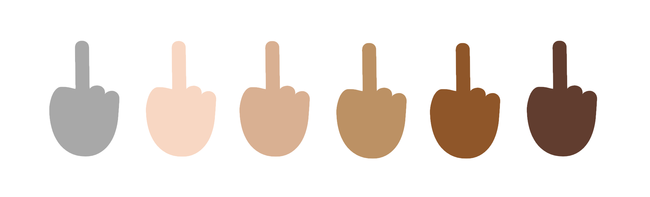
There’s one emoji that has been a topic of debate and Microsoft has become the first company to support the “reversed hand with middle finger extended” or simply the middle finger emoji.
According to Emojipedia, Windows 10 now supports the middle finger emoji. However, Apple, in its latest iOS 8.3 update, refused to include this possibly offensive emoji. But the software giant didn’t think that much and included it in the upcoming operating system.
This middle finger emoji has curiously remained absent form OS X, Android, iOS and Windows till now.

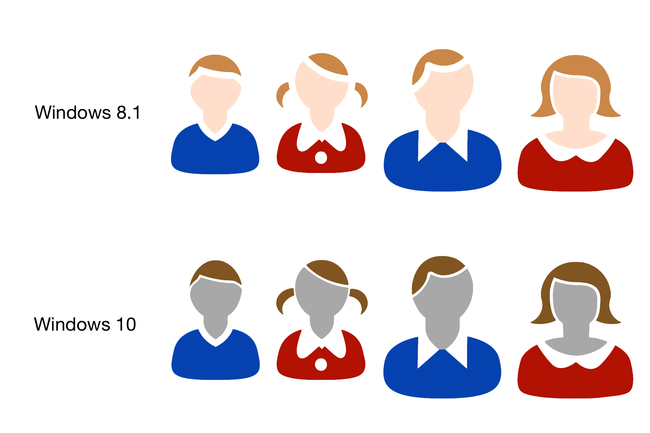
Gray is the neutral color in Windows 10:

Following the Unicode recommendation, Windows 10 will be having the default skin color as gray (the new race-neutral default). Apple and Google use a bright yellow shade as default tone, but Microsoft will now use gray as the default.
A choice of skin tones is present for the most emojis that look like human.

Did you like the middle finger emoji? Tell us in comments below!